Build a Chatbot Appointment Scheduling Flow for Your Website
Most service businesses lose potential clients not because their offer is weak, but because booking feels like work. A visitor lands on your site, gets interested, then faces a contact form, a calendar widget, or worse — a phone number. The moment of intent passes.
Conversational appointment booking changes the mechanics of that moment. Instead of handing the visitor a tool and stepping back, the website actively guides them: asks a clarifying question, narrows the options, confirms a slot. The interaction feels like a dialogue, and dialogues are easier to finish than forms.
There is a psychological dimension here that calendar widgets miss entirely. When a visitor fills out a form, they are doing administrative work on behalf of your business. When they answer a question in a chat, they are having a conversation. The cognitive load is lower, the sense of progress is clearer, and the threshold to complete the interaction drops. That difference shows up in booking rates.
This shift matters most at the top of the funnel, where intent is real but commitment is still fragile. A booking flow embedded in a chat interface captures that intent at the exact point it appears, without redirecting visitors to another page or asking them to figure out the next step on their own.
Small businesses live and breathe connection. A potential client visits your website, intrigued by your service. They want to book a consultation, but the process can feel like a hurdle — forms, back-and-forth emails, or a phone call they’d rather avoid. Many pause, some leave. Now imagine a different scenario: a friendly chatbot greets them, asks a few natural questions, and secures a slot in your calendar in under a minute. This is the power of automated dialogue scheduling. It’s not just about booking appointments; it’s about creating trust, saving time, and boosting sales. Let’s outline how small businesses can leverage this approach to grow their online presence and get more clients.
Jump to a section
What chatbot scheduling actually is
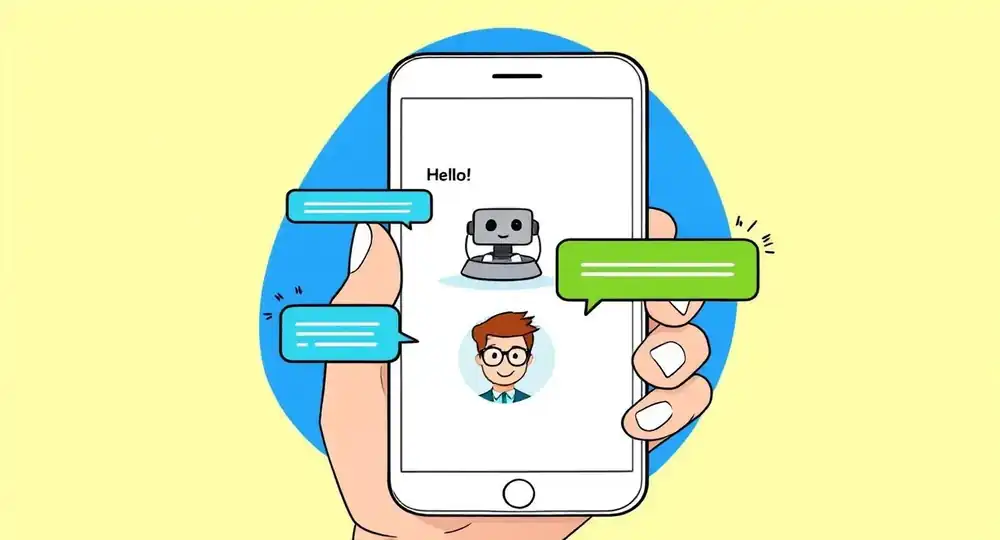
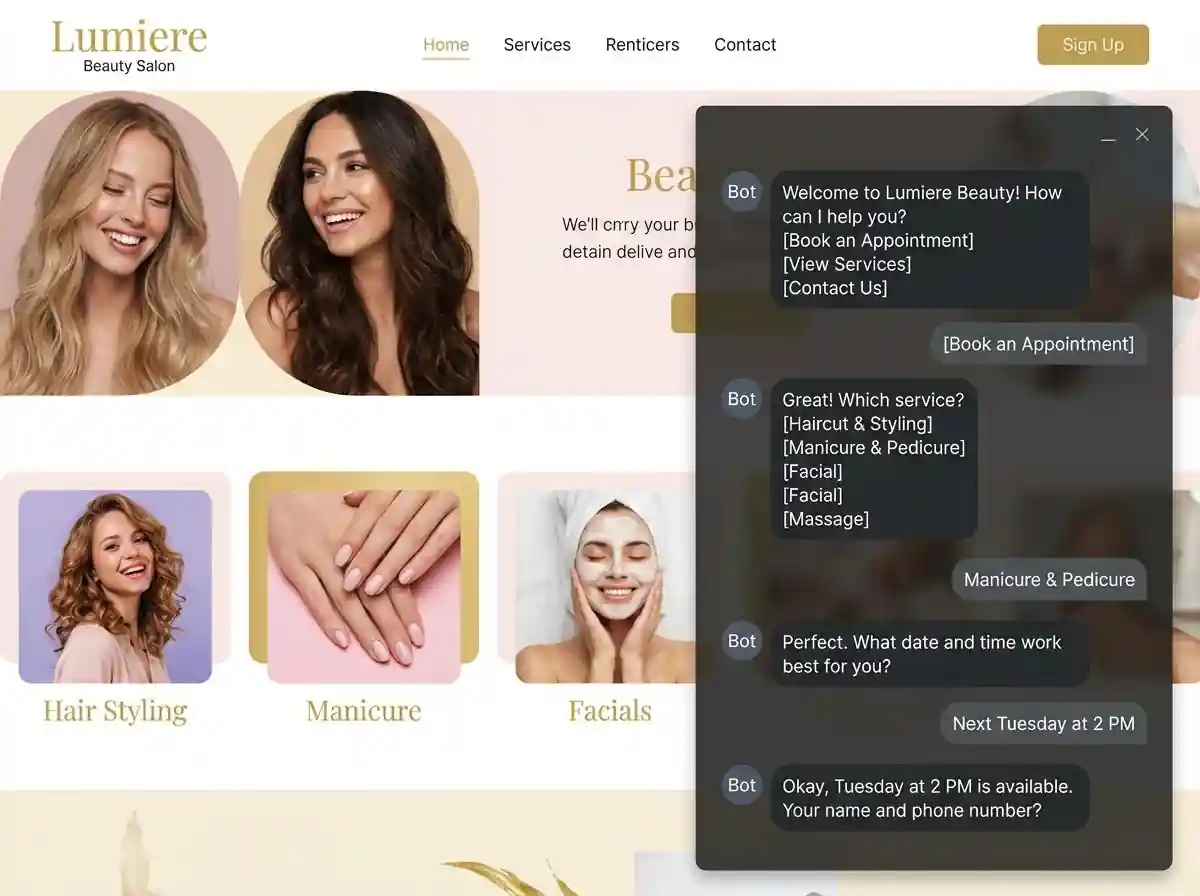
A website appointment chatbot is a scripted or AI-driven conversation layer on your website. It qualifies the visitor, identifies what kind of appointment they need, checks real-time availability, and confirms the booking — all within the same chat window.
The difference from a standard calendar widget comes down to context. A widget shows slots. A chatbot asks why the visitor is there, what they need, and then shows the right slots. That extra layer of qualification reduces no-shows, improves match quality, and gives you data that a passive calendar never could.
It is worth being precise about what "AI-driven" means in this context. Most AI scheduling chatbots for websites do not rely on open-ended language generation. They follow a decision tree with natural language input handling — meaning the visitor can type "sometime next week, preferably morning" and the system understands that, maps it to available slots, and responds accordingly. The intelligence is in the interpretation of flexible input, not in generating unpredictable responses. That distinction matters for reliability: the flow stays on track even when visitors phrase things in unexpected ways.
What typically happens under the hood:
- the chatbot collects basic information: service type, preferred time, contact details;
- it connects to a calendar (Google Calendar, Outlook, or a CRM-integrated system) to check availability in real time;
- it confirms the appointment and triggers an automated reminder sequence;
- the conversation data gets stored for follow-up or segmentation;
- if the visitor abandons mid-flow, the partial information can be used to send a re-engagement prompt.
Integrating calendar features into chatbots is no longer a complex engineering task. Most modern website builders and chatbot platforms offer native connections, and the configuration is closer to filling out a settings form than writing code.
How chatbot scheduling improves conversions
The conversion logic here is straightforward. Every extra step between intent and confirmation costs you bookings. A chatbot appointment scheduling flow compresses that distance — but the mechanism goes deeper than just reducing clicks.
There is a qualification effect. When a chatbot asks "Is this for a one-time consultation or ongoing support?" before showing availability, it does two things at once: it pre-qualifies the lead and sets the client's expectations. Appointments booked with that context have a lower cancellation rate and a higher chance of converting into repeat business. A client who has already described their situation before the first meeting arrives better prepared, which makes the appointment itself more productive.
Timing is another variable. A chat interface works at 11 PM on a Sunday just as well as at noon on Tuesday. For service businesses with clients in different time zones, or clients with irregular schedules, around-the-clock access translates directly into bookings that would otherwise never happen. The window of intent for many clients is narrow — thirty minutes of focused attention after the kids are in bed, or a lunch break spent on personal admin. If your booking flow is not available and frictionless in that window, the moment passes.
Conversational booking UX also supports upselling in a way that feels natural rather than intrusive. A hair salon bot that asks "Would you like to add a conditioning treatment?" inside an active booking conversation gets a different response than a pop-up making the same offer after checkout. The context of an ongoing exchange makes additional offers feel like relevant suggestions rather than interruptions.
There is also a data dimension that compounds over time. Every completed booking conversation leaves a record: service type requested, time preferences, how the visitor found the site, what questions they asked. That information informs your marketing, your scheduling patterns, and your service offering in ways that a calendar full of anonymous bookings never could.
Use cases
AI-powered booking conversation flows work across a wide range of business types. The underlying mechanics are the same; what changes is the qualifying logic and the calendar structure.
Services
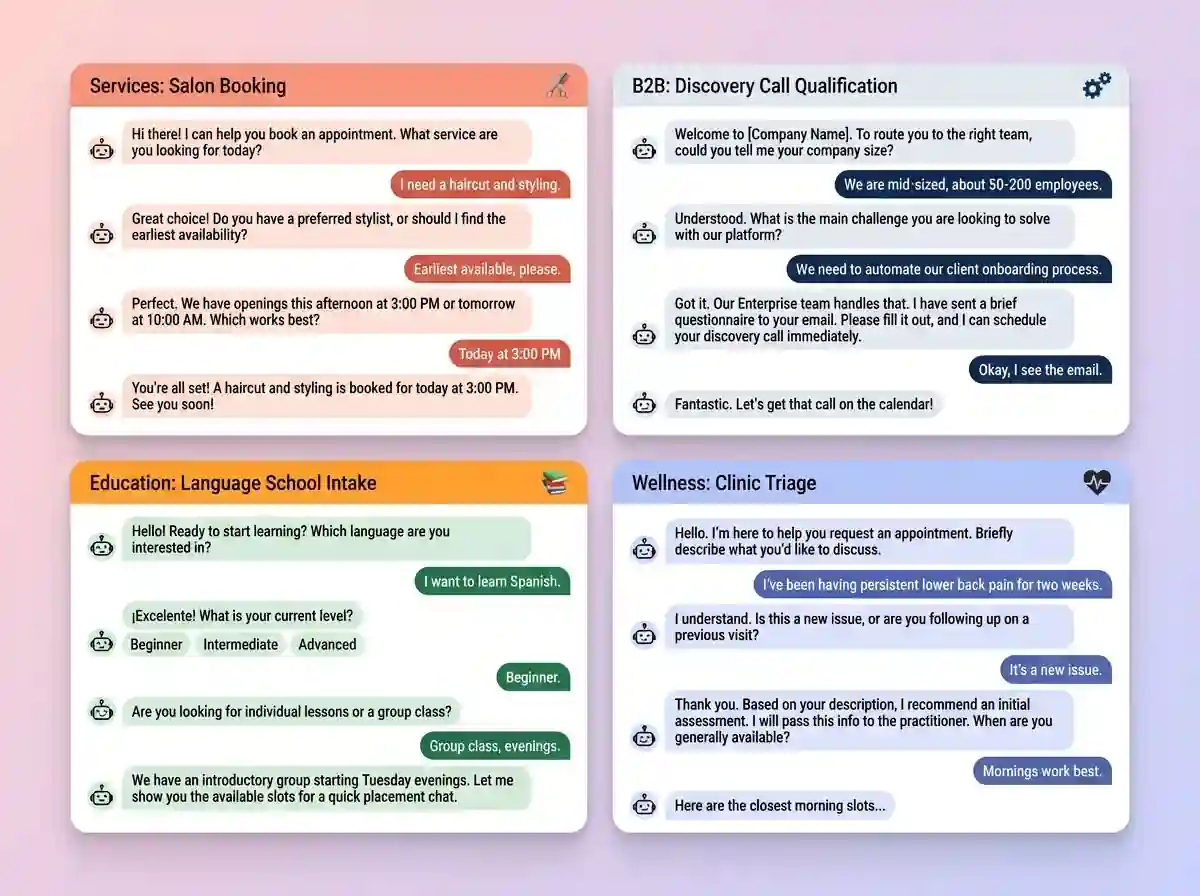
For service businesses — salons, fitness studios, legal consultations, medical practices — the chatbot typically asks about service type, practitioner preference if relevant, and time. The conversation is short and the booking usually happens in under two minutes. The value here is volume and consistency: every visitor gets the same smooth experience regardless of whether your front desk is busy or closed.
B2B
For chatbot meeting scheduling in a B2B context, the flow is longer and the stakes per booking are higher. A software consultancy or a financial services firm needs to qualify the lead before putting it on a sales calendar. The chatbot might ask about company size, the nature of the inquiry, and urgency, then route to the right team member and send a pre-meeting questionnaire automatically. This keeps the sales team's time focused on conversations that are already qualified. A poorly qualified discovery call costs roughly the same time as a well-qualified one — the difference is entirely in the outcome.
Education
Education and coaching businesses have a slightly different pattern. The chatbot often needs to establish where the client is in their journey — beginner or advanced, individual or group, short-term or ongoing commitment — before it can offer relevant slots. A language school, for example, might route clients to different teachers based on level and schedule, and that routing happens inside the chat before any calendar is shown. The intake function, done conversationally, replaces a long form and feels less clinical — which matters when the client is already slightly anxious about starting something new.
Wellness
Healthcare and wellness providers operate under additional constraints around privacy and compliance, but the scheduling logic is the same. The chatbot handles triage — directing clients to the right type of appointment based on their described situation — while the clinical decisions stay with the professional.
What these use cases share:
- a short qualifying exchange that replaces a generic form;
- real-time calendar sync that eliminates back-and-forth emails;
- automated confirmation and reminders that reduce no-shows;
- a record of the conversation that informs the follow-up;
- routing logic that matches the visitor to the right service, time, or team member without manual intervention.
From visitor to confirmed booking: how the flow works
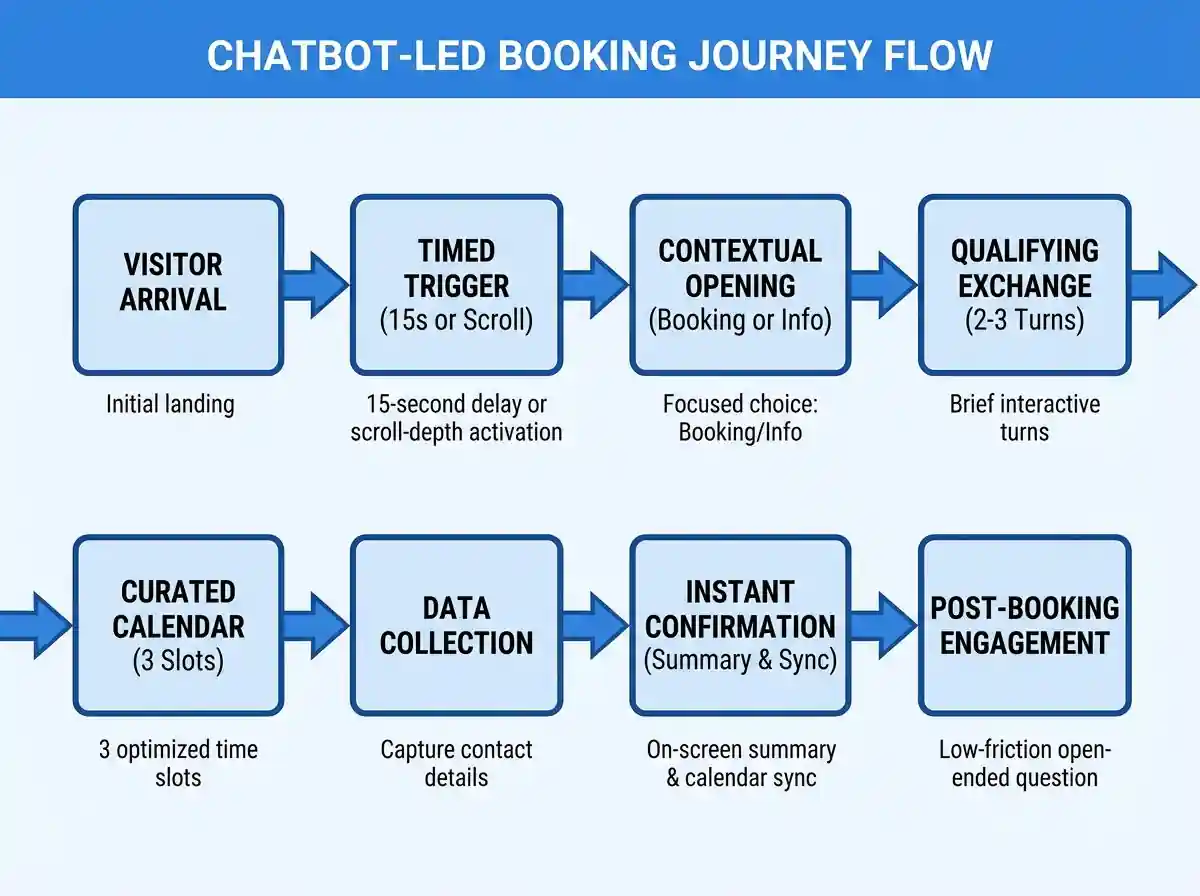
A well-designed automated dialogue scheduling flow follows a clear sequence, and the design decisions at each stage have measurable consequences.
The visitor lands on the site. The chatbot opens — not immediately, but after a brief delay or triggered by a specific page or scroll depth. Timing the trigger matters: a chatbot that fires the instant someone arrives reads as aggressive. One that appears after the visitor has spent fifteen seconds on a service page is contextually relevant.
The opening question sets the tone. "How can I help?" is generic and puts the work back on the visitor. "Are you looking to book a consultation or find out more about our services first?" is focused and gives the visitor an easy choice. That distinction affects completion rates more than most businesses expect.
The qualifying exchange takes two or three turns. Based on the answers, the chatbot filters the calendar and presents a small number of relevant options — three slots, not thirty. Choice overload is a real conversion problem: visitors presented with too many options take longer to decide and abandon more often. A curated shortlist, even if it does not include the visitor's ideal time, converts better than an open calendar.
The visitor picks a slot. The chatbot collects contact details — name, email, phone if needed — and confirms the booking with a clear summary. That confirmation is the moment the scheduler chatbot integration earns its place. The visitor does not need to check their email or wonder if the booking went through. The answer is right there in the chat window, followed by an automatic calendar invite.
The post-booking moment is underused by most businesses. A chatbot that confirms the appointment and immediately asks "Is there anything you'd like us to know before we meet?" opens a low-friction channel for useful context. Clients share information in that moment that they would never put in a form.
How to build a website with a chatbot appointment scheduling flow on Closer
Step 1. Build your site
First, build your website with Closer. From a short brief about your business, the AI generates a complete site: original design, copy, logo, and images — all ready to adjust or regenerate as many times as needed. Every site is fully mobile-responsive, which matters directly for booking performance: a significant share of appointments get confirmed on a phone, often during a commute or a lunch break.
Step 2. Set up the booking chatbot
Choose a scheduling service or any tool that supports custom conversation flows with calendar integration. Before touching any platform settings, map the qualifying logic on paper. Decide what information you need from the visitor before showing availability, and keep the exchange to two or three questions at most.
A simple AI scheduling chatbot for website flow for a consulting firm might look like this:
-
opening: "Are you looking for a one-time consultation or ongoing support?"
-
branch A — one-time: "What's the main topic you'd like to cover?" → free-text input → calendar shows slots for a 45-minute call → confirmation sent automatically.
-
branch B — ongoing: "How large is your team?" → three options → "Here's what a typical engagement looks like for teams your size." → calendar shows slots for a 60-minute discovery call → pre-meeting questionnaire sent on confirmation.
The structure applies across industries: the opening question segments the visitor, each branch addresses a specific situation, and every path ends with a confirmed booking or a concrete next step. No branch should exceed four exchanges — beyond that, visitors tend to disengage regardless of how smooth the flow is.
Connect the chatbot to your calendar (Google Calendar or Outlook) inside the tool's settings. Configure automated confirmation messages and at least one reminder before the appointment. If the platform supports it, enable a post-abandonment prompt for visitors who drop off mid-flow.
Step 3. Embed the chatbot into your site
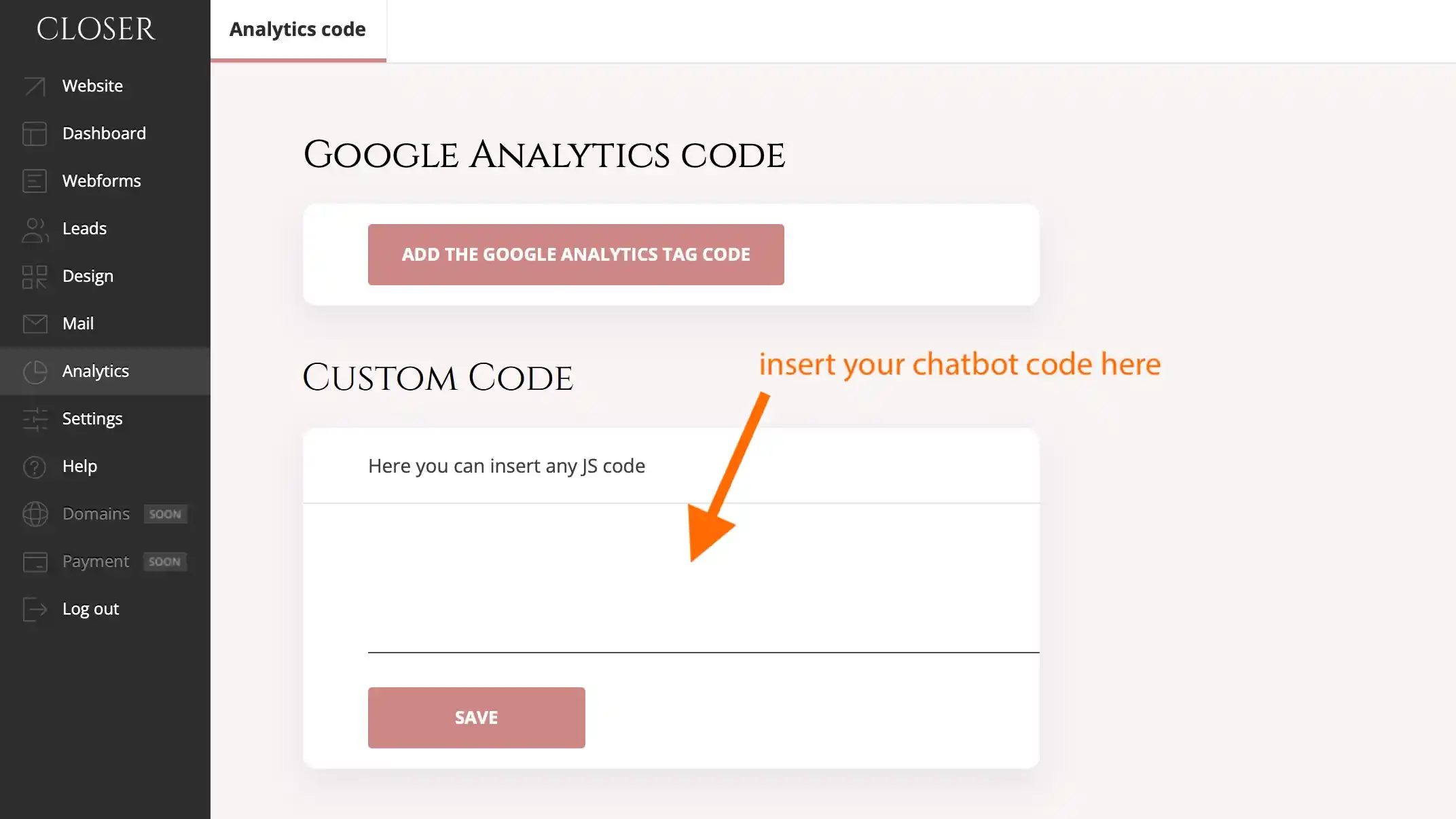
In the Closer dashboard, open the Analytics section and paste the chat embed code into the "Custom code" field. The AI-powered booking conversation flow goes live on your site immediately, ready to handle bookings from the first visitor.
Summary
Chatbot scheduling works because it meets visitors at the point of intent and moves them through a decision without friction. The qualifying exchange improves lead quality. Real-time calendar sync eliminates coordination overhead. Automated reminders reduce no-shows. The conversation record informs follow-up and marketing.
This approach suits service businesses, B2B companies with a consultative sales process, and education or coaching practices — any context where the booking itself is part of the client experience, and where lead quality matters as much as lead volume. The technology is accessible, the setup is easy.
It is less suited to businesses where appointments are purely transactional and volume is the only variable. In that case, a simple calendar widget is sufficient.
Get started
Build your site with Closer, add a chatbot booking flow, and go live.