
How to map SEO keywords to sales intent
Getting traffic to your website feels like progress. And it is — until you check your sales numbers and realize that visitors are browsing but not buying. The gap between "lots of clicks" and "actual revenue" often comes down to one thing: the difference between keywords that attract attention and keywords that signal purchase readiness. This article walks through how to close that gap by mapping search intent to the right pages on your site, so your content works as a sales tool rather than a library.
Jump to a Section

Why SEO traffic doesn't convert
Most websites are optimized to be found, not to sell. That's a reasonable starting point, but it creates a structural mismatch. A visitor who lands on your page after searching "types of handmade candles" is in research mode. They want to learn. A visitor who searches "buy hand-poured lavender candle with gift box" has already made up their mind and is looking for a place to complete the purchase.
Both visitors arrive through search. Only one of them is ready to spend money. If your pages treat both the same way — same layout, same tone, same calls to action — you're leaving revenue on the table. The fix isn't to abandon informational content. It's to know which content serves which intent, and to build your pages accordingly.
SEO vs sales keywords and understanding intent
SEO keywords that convert aren't a separate category you discover in a keyword tool. They're the result of understanding where a searcher is in their decision process.
Search intent splits into four recognizable types.
- Informational intent covers knowledge-seeking queries: "how to choose a leather wallet" or "what is cold-pressed olive oil."
- Navigational intent targets specific brands or sites.
- Commercial investigation sits in the middle ground — "best noise-cancelling headphones under $200" — where the visitor is comparing options before committing.
- Transactional intent is the clearest purchase signal: "order engraved silver cufflinks," "buy custom yoga mat with logo."
SEO vs sales keyword targeting reflects a broader strategic choice:
- SEO targeting prioritizes visibility — you optimize for terms your audience searches at any stage, building a wide funnel.
- Sales keyword targeting narrows the focus to queries where the visitor is close to a decision.
Both are legitimate goals, but they require different content, different page structures, and different success metrics. Ranking on page one for an informational query is a win for SEO. A product page that ranks for a transactional query and converts at 4% is a win for sales. Conflating the two leads to pages that perform adequately at neither.
The distinction matters because keyword intent mapping for SEO and sales requires different content strategies for each stage. A transactional page shouldn't read like a blog post. An informational article shouldn't push for an immediate sale. Mixing these up is one of the most common reasons conversion rates stay flat despite strong organic traffic.
Sales keywords for website pages have one defining trait: they only work when the page matches what the visitor expected to find. That alignment is where conversions happen — or don't.
Mapping framework
A workable sales-focused keyword strategy starts with what you already have. Pull your current organic keywords from Google Search Console or your analytics platform. Then sort them by intent, not by traffic volume.
Here's a practical approach:
- list every keyword driving at least some traffic to your site;
- assign an intent label to each: informational, commercial, or transactional;
- flag keywords that are close to transactional but missing action-oriented language ("custom leather notebook" vs. "buy custom leather notebook");
- identify which pages each keyword lands on, and note whether the page content matches the intent of the query.
This audit usually reveals a clear pattern: high-traffic informational keywords going to pages that were built to sell, or transactional queries landing on generic category pages with no clear next step. Both are fixable once you see them.
For mapping search intent to conversion keywords, the goal is to match each stage of the buyer's journey to specific content. Someone at the awareness stage needs context and education. Someone at the decision stage needs pricing, specifics, and a direct path to purchase. The framework only works when these stay separate.
Intent by page type
|
Intent type |
Keyword examples |
Best page type |
|
Informational |
"how to care for linen fabric" |
Blog post, guide, FAQ |
|
Commercial investigation |
"best eco-friendly gift sets 2025" |
Comparison page, category page |
|
Transactional |
"buy engraved wooden cutting board" |
Product page, landing page |
|
Local/navigational |
"custom cake shop in Austin" |
Location page, contact page |
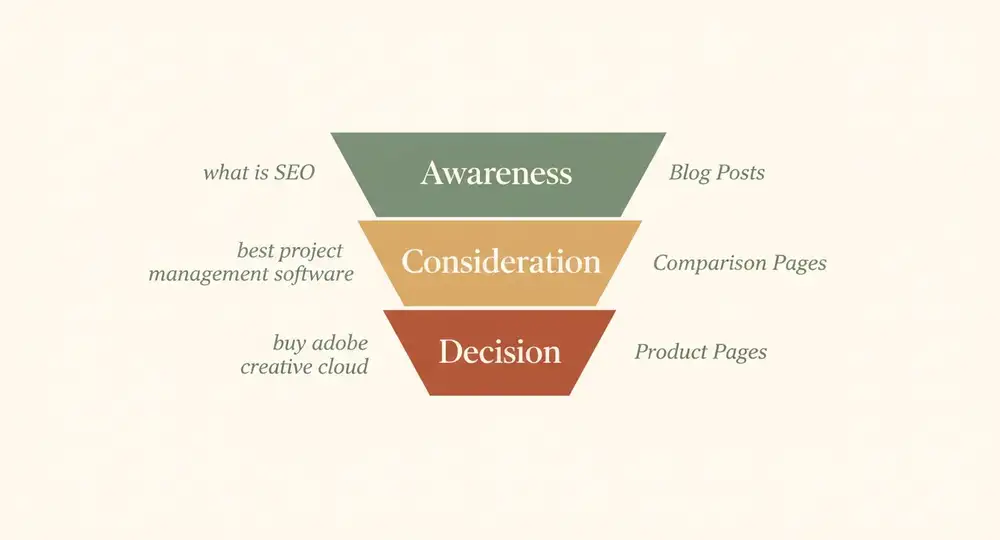
The most practical way to apply SEO to sales keyword map thinking is to assign keyword intent to specific page types across your site. Different pages serve different roles, and the content — including the keywords — should reflect that. Aligning buyer intent with keyword phrases at the page level has a direct effect on conversion. A product page optimized for "buy hand-glazed ceramic mug" should lead with the product image, price, customization options, and delivery timeline — not with a paragraph about the history of ceramics. That background might belong in a linked blog post, but it has no place as the opening of a transactional page.
The same logic applies in reverse. An informational article targeting "how to choose a skincare routine" shouldn't be stuffed with "buy now" buttons. It can include a soft product mention and a link to a relevant page — but the primary job of that content is to answer the question, build trust, and guide the visitor naturally toward the next step.
From traffic to conversion
Conversion-focused SEO strategy isn't about choosing between rankings and sales. It's about being deliberate with each page's purpose.
A few things worth getting right at the page level:
- product pages with transactional keywords should have the purchase decision information above the fold: price, availability, key features, and one clear action;
- category pages work best for commercial investigation keywords — they let visitors compare and filter, which is exactly what that intent requires;
- blog content targeting informational keywords should include contextual links to relevant product or landing pages, placed where they make editorial sense, not just appended at the bottom;
- meta titles and descriptions for transactional pages benefit from including the action word from the keyword ("order," "buy," "get") — it reinforces to searchers that this page will let them do what they came to do.
Separating informational and transactional content only works if you actually keep them separate. A page that tries to educate and sell at the same time tends to do neither well.
Buyer intent keywords also change over time. Search behavior shifts with seasons, trends, and how your audience's language evolves. Reviewing keyword performance quarterly — not just at launch — keeps your strategy current. If a phrase that was once driving conversions starts pulling in visitors who don't buy, that's a signal to look at what's changed on the search results page or in the audience itself.

How to map your keywords with Closer
Building a site that's properly mapped to search intent is one thing. Building it without technical help is another. This is where keyword intent mapping for SEO meets the practical reality of actually getting pages live.
Step 1. Create your site
Start by creating your website in Closer. From a short description of your business, the AI builds a complete site: original design, copy, logo, and images. Every section is editable, and both design and content can be regenerated as many times as needed until the result matches your goals. The site is fully mobile-responsive from the start, which matters for conversion since a large share of purchases happen on phones.
Step 2. Map your keywords to pages
Before editing any content, create a simple keyword map. List your three to five highest-intent keyword targets for each main page: homepage, product or service pages, any landing pages you plan to run. For each keyword, note the intent type and the primary action you want the visitor to take. This map becomes your editorial brief for each page.
Step 3. Edit page content to match intent
In the Closer editor, open each page and align the copy to its mapped intent. You can either do it manuall, or ask Closer AI assistant to do it for you. For transactional pages, lead with the purchase-relevant information: what the product does, what it costs, how to get it. For commercial investigation pages, make sure the content helps visitors compare and decide — feature breakdowns, use cases, and clear differentiation. Closer's block library gives you ready-made section layouts for different content types, so you're not building from scratch. If a generated section doesn't fit, swap it for one that does or regenerate it entirely.
Step 4. Review SEO settings
Closer generates meta titles and descriptions for each page automatically as part of the initial site build. Open each page in the dashboard and review what was generated. For transactional pages, make sure the meta title includes the action word from your target keyword. For informational pages, check that the title matches the question the visitor is trying to answer. Adjust where needed — the settings are accessible without any technical knowledge and go live immediately on publish.
Step 5. Publish and track
Once the pages are live, connect your analytics and monitor which keyword-to-page combinations are driving not just traffic, but actions — contact form submissions, purchases, sign-ups. Adjust content based on what the data shows. If a page with transactional intent is getting clicks but no conversions, review whether the page's primary information answers what the visitor needs before they'll commit.
Aligning buyer intent with keyword phrases at the page level is something you can set up in a day with Closer, then refine over time as you learn more about how your audience actually searches.
Summary
The core insight here is simple: traffic and conversions require different things from your content. SEO keywords get you found. Sales keywords for website pages get you paid. The gap between them is intent, and intent maps to specific page types.
What you can do today: audit your current keyword-to-page assignments. Identify at least three pages where the keyword intent and the page content don't match, and fix one of them this week.
The mistake worth avoiding: optimizing every page for the same broad audience. A product page and a blog post serve different visitors at different stages. Treating them the same dilutes both.
This approach works well for small and mid-sized businesses with a clear product or service offering, a limited number of pages, and a concrete conversion goal — a purchase, a booking, a quote request. It's less straightforward for large e-commerce catalogs or sites with dozens of service lines, where keyword mapping becomes a more extensive project.
Whether you're starting from scratch or rebuilding, Closer delivers you a properly structured, mobile-ready site live quickly — with content and design already in place — so you can start mapping intent to pages from day one rather than retrofitting an existing site that was built without this in mind.


