Use portfolio website thinking to write outreach emails that convert
Cold outreach rarely feels rewarding at first glance. You spend time shaping a message, hit send, and silence follows. Most inboxes swallow incoming emails without a trace. Yet the gap between ignored pitches and actual replies often boils down to one thing — deliberate structure. The same thoughtful structure that makes certain portfolio websites quietly pull visitors in and guide them toward contact.
Portfolio sites do not shout for attention. They invite quietly. They show proof of skill instead of claiming it. They lead a visitor step by step until reaching out feels like the obvious next action. Emails gain the same advantage when shaped around those patterns. The message stops feeling like an interruption and starts behaving like a brief, focused conversation that respects how little time the reader actually has.
Jump to a Section
- Why portfolio thinking improves your cold emails
- Key sections of a high-converting portfolio website
- How Closer helps you build a portfolio that converts
- How to mirror portfolio structure in your outreach
- Examples: portfolio to email flow
- Tips for freelancers and creatives
- Why an online portfolio works so well: trust, clarity, SEO, responses
- Launch your portfolio in minutes
- FAQ: using portfolio sites to get clients
Why portfolio thinking improves your cold emails
Portfolio websites convert because they solve a precise problem: how to convince a complete stranger — in under thirty seconds — that you understand their world and can deliver meaningful value inside it. Visitors arrive with natural skepticism. They need relevance, competence, and proof almost instantly.
Emails face exactly the same test, but with far less space and even less patience. The recipient opens the message on a phone during a walk, in a meeting break, or while waiting for coffee. You have perhaps ten to twelve seconds before the swipe deletes it forever.
Borrowing portfolio architecture creates small but powerful moments of trust:
- A subject line that promises a clear, specific outcome (exactly like a strong headline);
- An opening that positions you sharply and briefly (mirroring a concise About block);
- One focused piece of proof (acting as a single project showcase);
- A low-friction, obvious next step (similar to a persistent, well-placed CTA button).
This rhythm already feels familiar to anyone who has browsed a clean creative portfolio. Familiarity reduces resistance. Reduced resistance lifts reply rates noticeably.
Key sections of a high-converting portfolio website
Strong portfolio sites follow a small handful of architectural decisions that appear consistently across successful examples.
- Hero section. Often a full-width image, short looping video, or clean gradient background paired with one sharp line that names who you serve and the outcome you create. Example: “I craft brand identities that help startups stand out in crowded markets.” Immediate context, zero decoration.
- About / introduction block. One tight paragraph on background, one on your approach or philosophy, occasionally one short client quote. Almost never more than 120–150 words altogether. Readers want a glimpse of personality, not a full resume.
- Selected work / projects grid. This is the real core. Four to eight projects at most. Each card features a strong visual, a title that hints at industry or result (“Fintech Mobile App – +47% user retention”), and one teaser sentence. Clicking opens the full case: problem statement → your approach → deliverables → measurable outcome.
- Services / process overview. Optional. When included, it stays visual — simple icons or numbered steps rather than long paragraphs.
- Testimonials or client logos. Positioned after the projects so social proof lands only after the visitor has already seen real work. Short quotes outperform lengthy ones.
- CTA elements. “Start a project” or “Book introductory call” buttons appear at least three times: right after the hero, at the end of project sections, and in a sticky footer or dedicated contact area.
- Contact / footer. Calendar embed, direct email, social icons, sometimes a minimal form. Keep fields to name, email, and message.
Every section exists to move the visitor forward or remove a specific doubt. Decorative elements rarely survive in high-converting versions.
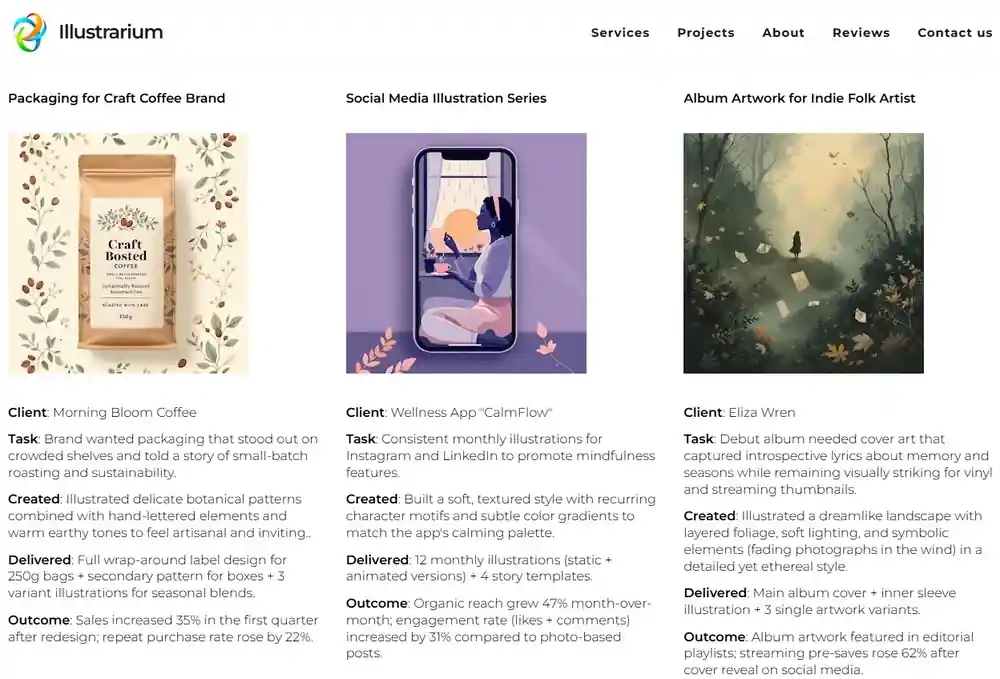
See this portfolio website built on Closer
How Closer helps you build a portfolio that converts
Closer AI Website Builder removes most of the traditional friction from this process.
You describe your niche, target clients, and goals in plain language. The AI generates a complete starting site: layout that follows proven portfolio logic, conversion-focused headlines, project placeholders with sample copy, thoughtful color palette, logo variations, and even custom images that match your aesthetic. Nothing feels off-the-shelf because the generation draws directly from your input. Just add your real works to the portfolio ― and you are ready to start.
Not satisfied with the first draft? Regenerate any part — hero section, About text, individual project blocks, color schemes, or single images — as many times as needed until it aligns perfectly. Once the foundation feels solid, open the visual editor. Drag and drop from a large library of ready blocks, adjust spacing and typography, apply subtle design effects, reorder entire sections. No code ever appears.
For those who want complete control, canvas mode gives a blank workspace where you build exactly what you envision while still calling on AI to generate assets on demand.
SEO settings live right inside the editor — meta titles, descriptions, alt text, clean slugs, structured data options. Mobile layout adjusts automatically and always looks intentional across screen sizes.
The practical result: a polished, professional portfolio site often goes live in under thirty minutes. You bypass weeks of design revisions, content writing blocks, and endless stock photo searches. The moment the site exists, you can start linking it in outreach emails and let real work handle the persuasion.
How to mirror portfolio structure in your outreach
It’s not hard to translate the portfolio flow directly into email structure. Keep every element brief and purposeful.
Subject line = hero headline
Focus on outcome and specificity.
Examples:
“Raising reply rates on creative outreach”.
“Better project flow for your agency site”.
“UX patterns that lifted client signups 2.7×”
Opening (1–3 sentences) = About block
Name + one-sentence positioning + clear reason for reaching out.
“I design portfolio sites for freelancers who want inbound leads instead of endless pitching. Saw your recent post about client acquisition — thought the structure I use might spark a few ideas.”
Main proof (2–5 sentences) = one project showcase
Choose the single most relevant case. Problem → what you did → concrete result.
“Last quarter I rebuilt a motion designer’s site. Before: scattered projects, no clear CTA. After: clean grid + process pages + embedded Loom walkthroughs. First month: 14 qualified inquiries vs 2 the previous quarter.”
CTA = contact button
One clear, time-bound ask.
“Would a 12-minute look at your current flow be useful? Here’s my calendar if yes: [link]. No pressure either way.”
Optional P.S. = secondary CTA or proof
Link to portfolio or attach one image.
“P.S. Quick before/after example here: [link]”
This skeleton usually stays under 150 words. Busy people actually finish reading it. When you apply this logic consistently you start seeing portfolio structure for outreach as a repeatable system rather than a one-off tactic. The same principles sharpen cold outreach email structure by making every sentence earn its place.

Examples: portfolio to email flow
Here are three cases for different niches that show exactly how the portfolio-to-email transfer works in practice. Each example starts from a real portfolio setup and moves straight into the outreach message it inspired. Notice how the language, focus on results, and overall rhythm carry over almost unchanged — making the email feel like a natural extension of the site rather than a separate sales pitch.
Example 1 — illustrator
Portfolio hero: “Illustrations that make complex ideas feel human.”
Projects: each spread shows the final piece + details.
Email subject: “Illustrations lifting engagement”
Body opens with quick positioning, shares one relevant project summary, ends with calendar link. Reply rate rises noticeably when the portfolio link is included.
Example 2 — motion designer
Portfolio hero: “Fluid animations that bring brands to life without overwhelming the message.”
Projects: each case features short embedded clips (or GIFs), breakdown of keyframes/motion principles and technologies used, and outcome notes (“Homepage scroll engagement +54%, bounce rate down 28%”).
Email subject: “Motion that boosted scroll time 50%+”
Body: short intro positioning as a motion specialist for digital products, one project excerpt (“Turned a static SaaS landing into a dynamic experience — visitors spent 54% more time exploring”), direct ask: “Curious if similar energy would fit your next launch? Calendar here if yes.” Recipients frequently reply asking for a quick moodboard or reference clip.
Example 3 — brand strategist
Portfolio About page explains “I build visual systems that scale with revenue stages.” Projects show brand evolutions with before/after moodboards and KPI shifts.
Outreach email uses the same language: “Helped a SaaS move from startup palette to enterprise brand — NPS climbed 19 points.” Link follows immediately.
The pattern holds steady: when email content echoes portfolio content, trust transfers instantly.
Tips for freelancers and creatives
Adaptations of portfolio websites by discipline:
Designers
- Prioritize large preview images
- Show process in small steps (wireframe → prototype → live)
- Include device mockups
- Add short client video testimonials when possible
Copywriters
- Lead with strongest headlines + opening paragraphs
- Show A/B test results when available
- Use pull quotes from published work
- Embed swipe files as image carousels
Developers / no-code builders
- Embed live sites in iframes where allowed
- List performance metrics (Core Web Vitals scores)
- Show accessibility improvements
- Highlight integrations built
Photographers / videographers
- Full-bleed hero images or short reels
- Categorized galleries (commercial, personal, editorial)
- Behind-the-scenes stills
- Client usage examples (magazine covers, billboards)
Common upgrades for any niche:
- Add subtle micro-animations on scroll
- Use consistent typography hierarchy
- Implement lazy loading for images
- Create project filters (industry, service type)
- Include RSS or newsletter signup in footer
A common practice is to start with a website template for creatives and then customize heavily — this saves hours while still allowing full personal expression.
Why an online portfolio works so well: trust, clarity, SEO, responses
A live portfolio site creates credibility that no email signature can match. Prospects see finished work immediately — colors, spacing, attention to detail. That single glance communicates professionalism more convincingly than any claim.
Clarity accelerates understanding. A visitor grasps your aesthetic and approach in under ten seconds. Words describe; images prove.
Search visibility grows steadily. When pages use descriptive slugs, keyword-rich headings, proper schema, and fresh content, Google begins sending relevant traffic. A steady stream of organic visitors arrives already pre-sold on your style.
Inquiry volume changes too. When a strong CTA sits in multiple places and the whole site feels approachable, visitors convert on their own schedule. Many reach out weeks after first landing — something cold emails alone rarely achieve.
A well-structured site also converts with portfolio design by guiding attention exactly where you want it and turning passive scrolling into active interest.
Launch your portfolio in minutes
The fastest way to test this thinking is to build the site first.
With Closer you skip the months-long build cycle. Describe your work, let AI create the foundation, refine what you like, publish. Often the entire process takes less than half an hour.
Start here: try a portfolio website builder on Closer today. Free to begin, no card required.
Once live, drop the link into your next ten outreach emails. Watch which version — with or without portfolio — gets answered more often.
FAQ: using portfolio sites to get clients
How frequently should projects be refreshed?
Every time you complete strong new work — ideally every 2–4 months. Fresh content signals an active practice.
Is it better to show variety or deep focus?
Deep focus usually wins for outreach. One coherent specialty attracts better-fitting clients than scattered skills.
Should pricing live on the portfolio?
Rarely. Let pricing discussions happen after initial contact. Public prices can filter out good prospects too early.
How does portfolio structure for outreach differ from regular portfolios?
Outreach-focused versions emphasize measurable outcomes and relevance to specific industries. They keep copy shorter and CTAs more frequent.
Can outreach website strategy include multiple portfolio versions?
Yes. Some creators maintain niche-specific landing pages — one for SaaS, one for e-commerce, one for agencies — and link the most relevant one per email.
Does how to build portfolio website logic apply to LinkedIn as well?
Absolutely. Treat your LinkedIn profile like a one-page portfolio: strong banner, concise About, featured section with project links, clear call-to-action in headline.
What makes a portfolio site for freelancers effective in cold outreach?
It provides instant proof. When you mention a result in the email and link directly to the matching project, the recipient sees evidence rather than hears a promise.
How can a landing page for personal brand support portfolio-based cold email campaigns?
The landing page acts as your always-on showcase. Emails drive traffic there, and the structured flow (hero → proof → CTA) closes more deals than text alone ever could.