
Write product descriptions that convert: proven tips for ecommerce success
Your product deserves better than a bland, forgettable description. You've spent weeks perfecting what you sell, but when shoppers land on your page, they scroll past and vanish. The gap between a browser and a buyer often comes down to one thing: how you present your product through words.
Product descriptions that sell don't recite specs. They connect. They answer the quiet questions running through a shopper's mind: "Will this solve my problem? Can I trust it? Why should I care?" Answer those well, and conversions follow.
This guide walks through the essentials: writing copy that speaks to real people, structuring pages for clarity, weaving in search-friendly language, and testing what actually works. Along the way, you'll see where tools like Closer fit in, helping you build pages that look sharp and read even sharper. Let's start with why so many descriptions miss the mark.
Jump to a Section
- Why most product descriptions fail to convert
- Key elements of a high-converting product page
- The anatomy of a great product description (with examples)
- How to generate and test product copy with Closer
- Writing for different niches: fashion, tech, beauty
- Using SEO to make descriptions work for Google
- Visual structure: how to present a product on your site
- Formula breakdown: AIDA in action
- Before and after: transforming weak descriptions
- Words that strengthen (and weaken) your copy
- Practical tips for different product types
- Why most product descriptions fail to convert
- Common SEO mistakes to avoid
- Testing what works
- FAQ: description length, SEO tips, AI tools
Why most product descriptions fail to convert
Shoppers abandon pages for reasons that seem small but cost you sales. A description might list every dimension and material but never explain what changes for the buyer. Or it sounds like every other store, recycling the same tired phrases. Sometimes the layout buries the most persuasive details under walls of text.
Three common mistakes stand out:
- Treating features as benefits without translating technical details into real outcomes.
- Ignoring the shopper's actual concerns, like durability, ease of setup, or whether it fits their lifestyle.
- Presenting information in dense paragraphs that demand too much effort to decode.
When a description feels generic or confusing, trust drops. Shoppers click away, sometimes to a competitor who succeeded to explain things better. Fixing this starts with rethinking what a description should accomplish: it's less about the product and more about the person holding their credit card.
Key elements of a high-converting product page
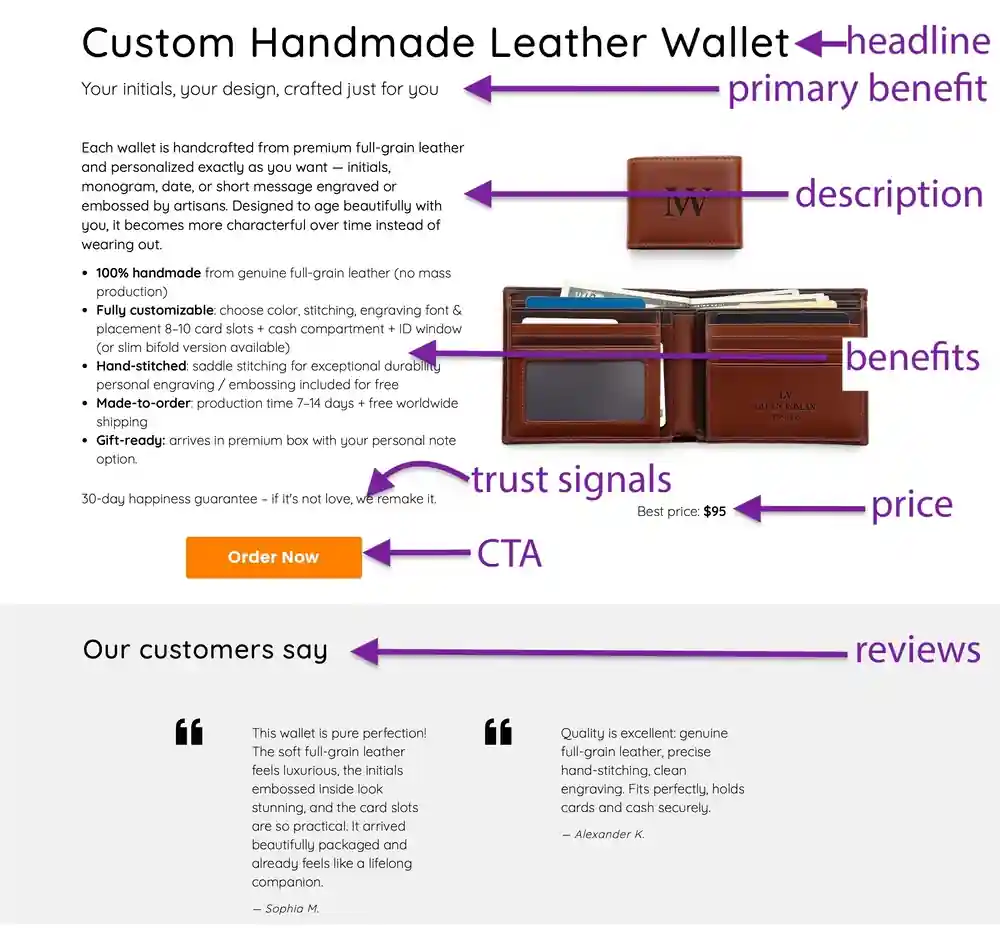
A page that converts balances clarity with persuasion. Start with a headline that names the product and hints at its core advantage. Follow with a short opening that sets the scene: what problem does this solve, or what desire doesIt fulfill?
Next, structure your content so skimmers and deep readers both get what they need:
- A brief introductory sentence that frames the product's purpose.
- A section highlighting the main outcomes, written from the buyer's perspective.
- Bullet points for quick-scan details like materials, dimensions, or compatibility.
- A closing nudge toward action, whether that's adding to cart or exploring a demo.
Closer's AI selling website builder generates the basis for this structure automatically, drafting headlines and body copy based on your product type. If the first version feels off, regenerate it. The editor lets you tweak tone, swap sections, or rearrange blocks without touching code. For someone launching fast, this removes the blank-page problem and gets a functional page live in minutes.
Visual hierarchy matters too. Break text into short paragraphs. Use whitespace generously. On mobile, each line should feel digestible, not cramped. Closer handles responsive design by default, so your descriptions read cleanly whether someone's on a phone or desktop.
The anatomy of a great product description (with examples)
Let's compare two approaches for the same item: a rechargeable desk lamp.
Weak version:
"LED lamp with adjustable brightness. USB rechargeable. Modern design."
Stronger version:
"Work late without straining your eyes. This rechargeable LED lamp adjusts from soft glow to full brightness, so you control the light that suits your task. No outlet hunting: a single USB charge powers up to 12 hours. The minimal design fits any desk without hogging space."
The difference? The second version answers unspoken questions. It paints a scenario (working late), solves a hassle (finding an outlet), and reassures about longevity (12 hours). How to write product descriptions that sell often hinges on this shift: from listing what something is to showing what it does for the buyer.
Another example, this time for skincare:
Weak:
"Face serum with vitamin C and hyaluronic acid. 30ml bottle."
Better:
"Brighten dull skin and lock in moisture with a serum that works overnight. Vitamin C fades dark spots, while hyaluronic acid keeps skin plump and hydrated. Wake up looking rested, even when you're not. One bottle lasts about six weeks with daily use."
Notice how the improved version skips jargon and focuses on visible results. It also includes a practical detail (six weeks) that helps shoppers gauge value. These tweaks feel minor but stack up: clearer outcomes, relatable language, and just enough specificity to build confidence.
How to generate and test product copy with Closer
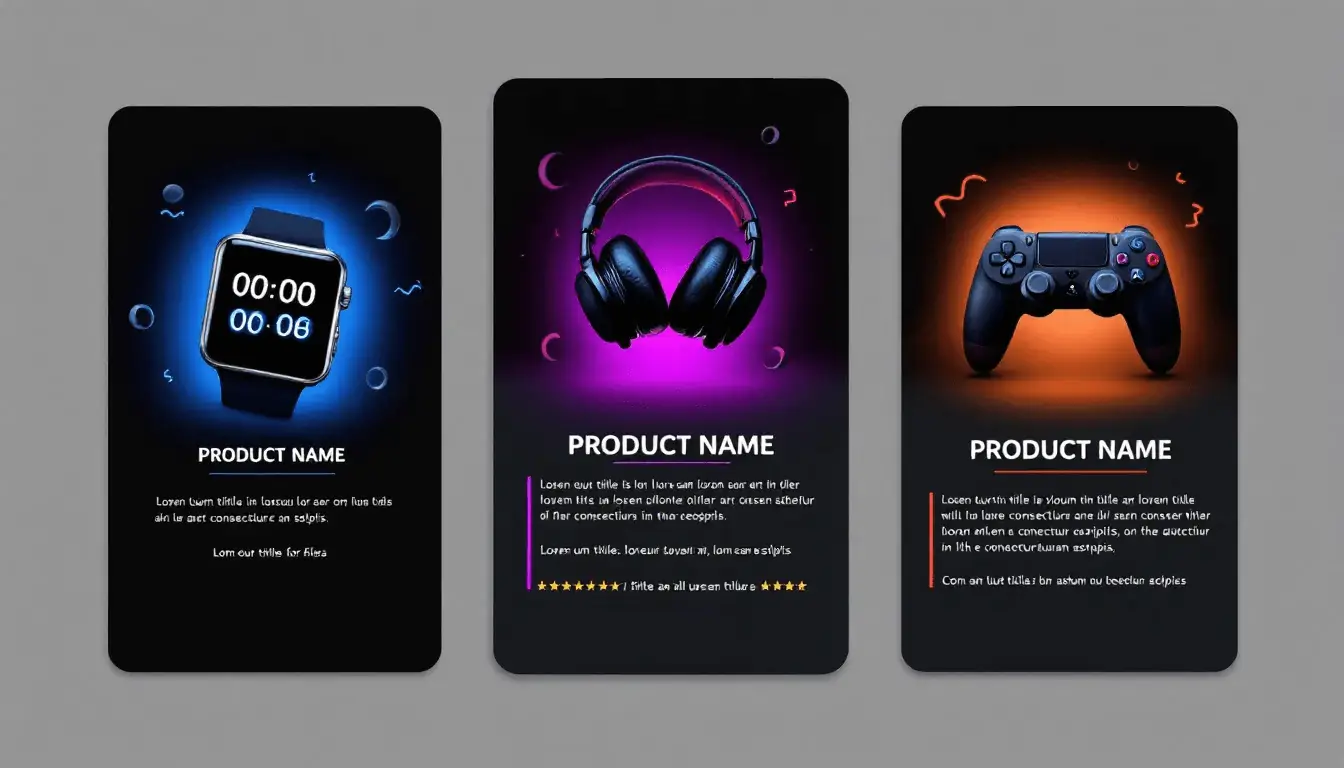
Closer's AI drafts a whole website along with product descriptions based on the information you provide: product name, category, key features. If you make a landing page ― just describe your products in the initial prompt you give to the AI when creating your website. Within a couple of minutes, you get a full webpage layout with headlines, body text, and suggested imagery. If you are making a full website with product pages ― add your pages to the site tree, then ask the AI assistant to write product descriptions as you provide it with basic information. Don't like the tone? Hit regenerate. Want a punchier opening? Edit directly in the builder.
Here's a practical workflow:
- Enter your product details and let the AI generate the first draft.
- Review the copy for accuracy and adjust any features that need emphasis.
- Swap design blocks from Closer's library to highlight testimonials, pricing tiers, or guarantees.
- Preview the mobile version to confirm readability on smaller screens.
- Publish when satisfied, or keep iterating if something feels off.
This approach shrinks the time between idea and live page. Instead of wrestling with a blank document, you start with a decent draft and refine it. For ecommerce product description tips, this method works especially well when launching multiple products: generate a batch, then customize the standouts.
Closer also supports SEO settings, letting you define meta titles, descriptions, and image alt text without leaving the editor. This keeps your page competitive in search results while you focus on persuasive copy.
Ready to build a page that turns browsers into buyers? Create your high-converting website with product descriptions right now!Writing for different niches: fashion, tech, beauty
Tone shifts depending on what you sell. Fashion thrives on aspiration and sensory language. Tech buyers want specs translated into tangible performance. Beauty shoppers look for transformation and trust.
Fashion:
Instead of "cotton blend dress," try "soft, breathable fabric that moves with you, perfect for humid afternoons or layering when the temperature drops." Mention fit, feel, and versatility. Shoppers imagine wearing it, not just owning it.
Tech:
Avoid drowning in gigabytes and megahertz. A laptop description might say: "Handles video editing without lag, stays cool during long sessions, and fits in your backpack without adding bulk." Relate performance to real tasks, not abstract benchmarks.
Beauty:
Focus on outcomes and routines. A cleanser description could read: "Rinse away the day without stripping your skin. This gel formula dissolves makeup and oil, leaving your face refreshed, not tight. Works well morning and night."
Each niche rewards specificity. Fashion benefits from describing texture and drape. Tech needs clarity around compatibility and speed. Beauty leans on results and gentle reassurance. Closer's AI product description generator adapts to these nuances when you select a category, giving you a tailored starting point.
Using SEO to make descriptions work for Google
Search engines surface your page when the words match what people look for. Ecommerce SEO content starts with identifying those phrases. Tools like Google's autocomplete, keyword planners, or competitor research reveal what shoppers search for: "wireless earbuds for running," "non-toxic cutting board," "budget standing desk."
Once you have a list, weave terms naturally into:
- The page title and H1 heading,
- Meta description,
- The first paragraph of body copy,
- Image alt text,
- Bullet points if they fit contextually.
Avoid cramming. A sentence like "Buy the best wireless earbuds for running, our wireless earbuds for running are the best wireless earbuds" reads terribly and harms rankings. Instead: "These wireless earbuds stay secure during runs, resist sweat, and deliver clear sound mile after mile." The keyword appears once, naturally.
Closer's SEO panel lets you adjust titles or descriptions before publishing. Write, optimize, publish, then monitor which pages attract traffic.
Long-tail phrases often convert better than broad terms. Someone searching "running earbuds under $50" has clearer intent than someone typing "earbuds." Target both, but prioritize the specific queries when writing product pages that convert.
Visual structure: how to present a product on your site
Even brilliant writing fails if buried in poor layout. Shoppers scan before they read, so guide their eyes with hierarchy:
- Lead with a headline that names the product and its main advantage.
- Follow with a two- or three-sentence paragraph that expands on the promise.
- Insert bullet points for specs, dimensions, or quick-hit benefits.
- Close with a call to action that feels frictionless.
White space between sections prevents overwhelm. Short paragraphs (two to three lines) keep momentum. On mobile, each paragraph should fit comfortably on screen without scrolling mid-thought.
Closer's block library includes pre-designed sections for testimonials, comparison tables, FAQ accordions, and image galleries. Drag them into your page, fill in the content (or let AI create it for you), and adjust spacing. The canvas mode offers pixel-level control if you want custom layouts, but most pages work fine with the library blocks.
Consider adding trust signals near the purchase button: a brief return policy note, a security badge, or a line like "Join 5,000 happy customers." These don't need lengthy explanations, just enough to reduce hesitation.
Formula breakdown: AIDA in action
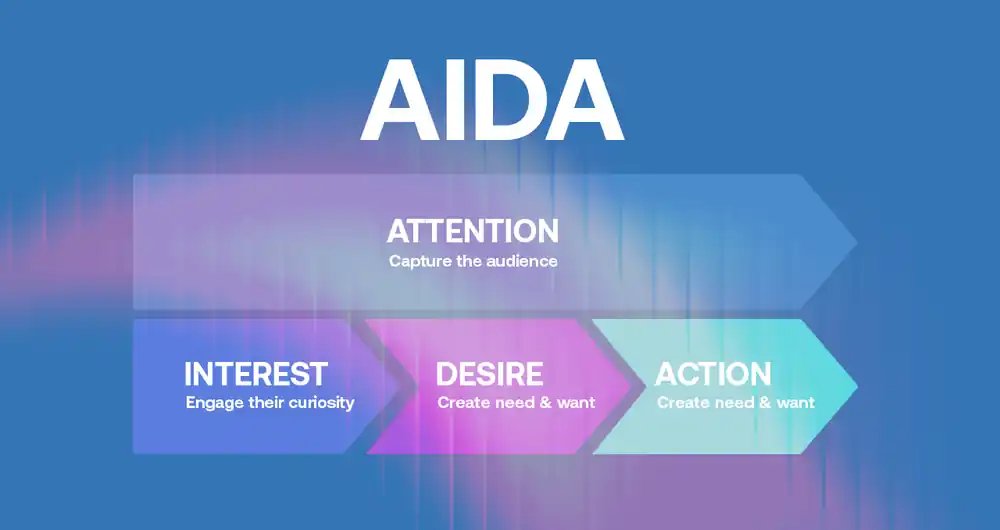
AIDA stands for Attention, Interest, Desire, Action. It's a classic framework for persuasive product copy, and it still holds up when talking about product discriptions.
Attention:
Open with a hook that stops the scroll. "Tired of tangled cords?" or "Finally, a backpack that fits everything."
Interest:
Explain how the product solves a specific problem. "This wireless charger snaps magnetically to your phone, eliminating fumbling in the dark."
Desire:
Paint the outcome. "Imagine setting your phone down at night and waking to a full battery, no cables tugging loose."
Action:
End with a clear next step. "Grab yours today and simplify your charging routine."
Here's a full example for a reusable water bottle:
Attention: "Single-use plastic? Not anymore."
Interest: "This stainless steel bottle keeps drinks icy for 24 hours and fits in any cup holder."
Desire: "Sip cold water through your commute, hike, or gym session without refilling halfway."
Action: "Order now and cut plastic waste for good."
The formula keeps copy focused. Each sentence has a job: grab attention, build interest, stoke desire, prompt action. Closer's AI drafts often follow this pattern by default, though you can adjust emphasis based on your audience.
Before and after: transforming weak descriptions
Let's take a generic blender description and rebuild it.
Before:
"High-speed blender with stainless steel blades. 1000-watt motor. BPA-free plastic jar. Three speed settings."
After:
"Blend smoothies, crush ice, and puree soups in seconds with a motor that doesn't quit. The stainless steel blades stay sharp through daily use, while the BPA-free jar holds enough for the whole family. Three speeds let you control texture, from chunky salsas to silky smoothies. Cleanup takes under a minute."
Changes made:
- Replaced "high-speed blender" with action verbs (blend, crush, puree).
- Turned "1000-watt motor" into a benefit (doesn't quit).
- Added context (whole family, chunky salsas).
- Closed with a practical detail (cleanup time).
This version tells a story instead of listing specs. It gives the shopper a mental image of using the blender, which makes the purchase feel real.
Another example for a yoga mat:
Before:
"6mm thick mat. Non-slip surface. Made from TPE material."
After:
"Practice without slipping, even during sweaty flows. This 6mm mat cushions your knees and wrists while the textured surface grips firmly on hardwood or tile. Made from eco-friendly TPE, it's light enough to carry but durable enough for daily sessions."
The second version connects material (TPE) to a benefit (eco-friendly), explains thickness in terms of comfort, and reassures about durability. Shoppers walk away knowing why each feature matters.
Words that strengthen (and weaken) your copy
Strong verbs energize descriptions and lift sales by making benefits feel immediate and tangible. Others flatten them. Compare these pairs:
| Weak Verb | Stronger Alternative |
| has | elivers, provides, includes |
| is | becomes, transforms, ensures |
| makes | creates, builds, achieves |
| does | performs, handles, tackles |
Adjectives also vary in punch. "Good quality" says little. "Scratch-resistant" or "fade-proof" gives tangible proof. Write copy that converts by favoring specifics over vague praise.
Avoid hedging words like "pretty," "fairly," or "somewhat." They dilute confidence. Instead of "fairly durable," say "withstands daily wear." Instead of "pretty easy to clean," say "rinses clean in seconds."
Power words spark emotion when placed strategically: instant, guaranteed, effortless, proven, exclusive. Don't overload every sentence, but sprinkle them where they amplify a key point.
Practical tips for different product types
Apparel:
Describe fit, fabric weight, and care instructions. Mention occasions: "ideal for weekend errands or casual Fridays." Include size guidance to reduce returns.
Electronics:
Translate specs into real-world performance. "Charges your phone three times before needing a refill" beats "10,000mAh capacity." Address compatibility upfront.
Food and beverage:
Highlight taste, texture, and sourcing. "Rich, dark chocolate sourced from single-origin farms" paints a vivid picture. Mention dietary details like gluten-free or organic early.
Home goods:
Focus on space, assembly, and maintenance. "Fits apartments without overwhelming the room. Assembles in 15 minutes with included tools." Practical details reduce friction.
Closer's content library includes sample blocks suitable for each category, so you're not starting from scratch. Swap in your details, adjust the tone, and you have a functional draft.
Where descriptions live on your site
Placement influences impact. On a product page, the description typically sits below the product name and price, adjacent to images. Some layouts split it: a brief intro above the fold, then detailed sections below.
Consider these zones:
- Above the fold: headline, price, primary benefit, and add-to-cart button.
- Mid-page: detailed description, bullet points, and trust signals like reviews or guarantees.
- Bottom: FAQ, shipping info, or related products.
Closer's drag-and-drop editor lets you imply and rearrange these sections. Preview how it looks on mobile to confirm nothing important gets buried. Full mobile responsiveness means your carefully crafted copy stays readable regardless of screen size.
Common SEO mistakes to avoid
Keyword stuffing damages readability and rankings. Repeating the same phrase every sentence triggers search engine penalties and alienates readers. Aim for one primary keyword per page, used naturally in the title, opening paragraph, and a few subheadings.
Ignoring meta descriptions is another miss. Google pulls this snippet into search results, so make it compelling: "Discover ecommerce product description tips that boost conversions and simplify your workflow."
Duplicate descriptions across similar products confuse search engines. If you sell three colors of the same bag, tweak each description slightly: mention the color's vibe (bold red, understated gray) or styling tips unique to that variant.
Closer's SEO settings flag duplicate meta titles and suggest alternatives, helping you stay on track without manual audits.
Testing what works
Launch a description, then watch the data. Track metrics like:
- Time on page: are visitors reading or bouncing quickly?
- Add-to-cart rate: do they engage after reading?
- Scroll depth: how far down the page do they go?
Run A/B tests by changing one element at a time: rewrite the headline, adjust bullet points, or swap the CTA phrasing. Tools like Google Optimize or built-in analytics show which version performs better.
Closer's analytics integrations let you monitor these metrics without juggling multiple dashboards. If a page underperforms, edit the copy directly in the builder and republish. No developer needed, no lengthy approval chains.
Customer feedback also reveals gaps. Reviews that mention confusion about sizing or compatibility signal where the description fell short. Revise those sections and see if returns drop.
Create a website with AI-generated product descriptions
FAQ: description length, SEO tips, AI tools
How long should a product description be?
Enough to answer key questions without rambling. Product description best practices show 150 to 300 words for most products. Complex items like electronics or furniture might need more. Fashion or simple accessories often work with less. Focus on covering benefits, specs, and trust signals concisely.
Can AI write descriptions that actually convert?
AI generates solid drafts quickly, capturing tone and structure based on prompts. Closer's AI product description generator handles the heavy lifting, but human editing sharpens the final copy. Review for accuracy, inject brand personality, and test different versions to see what resonates.
Optimize the entire page: fast load times, clear images, simple checkout, and visible trust signals like return policies or reviews. Descriptions are one piece. Pair strong copy with intuitive navigation and mobile-friendly design for the biggest lift.


