How to create a photography portfolio website
Your images deserve a home that sells your talent, not just displays it. A photography portfolio website transforms casual viewers into paying clients when built with strategy and speed in mind.
The difference between a gallery that converts and one that collects dust? Smart technology that handles the technical complexity while you focus on what you shoot best. Let's walk through building a portfolio that works as hard as your camera.
Jump to a Section
Choosing the right tool
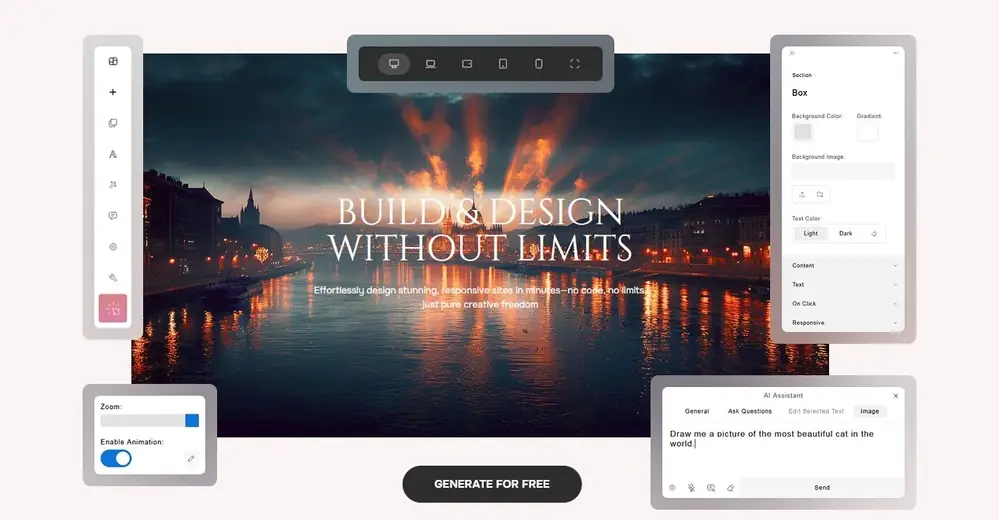
Most website for photographers solutions hand you empty templates and wish you luck. Closer AI takes a different approach. The platform generates complete designs tailored to your style, creates professional logos that match your aesthetic, and writes compelling headlines that explain your vision. Each element adapts to your photography niche, whether you shoot weddings, products, or landscapes.
The regenerate button changes everything. Don't like how a gallery section looks? Click once and the AI produces a fresh layout. Hate the color scheme? Generate another. This unlimited iteration removes the paralysis of "getting it right the first time" that stops many photographers from launching.
Two paths serve different needs. Beginners drag elements from a library of pre-designed blocks, adjust colors, and swap images through an editor that requires zero coding knowledge. Advanced users switch to Canvas Mode for pixel-perfect control, building custom layouts from the ground up. Both approaches deliver professional results to deliver the best free portfolio websites, but the speed difference matters for business.
Traditional website builders trap you in decision fatigue. Should the gallery employ a grid or masonry layout? What font pairs go well with your brand? How wide should the margins be? Closer's AI answers these questions instantly by analyzing your photography style and generating cohesive designs that follow current web standards.
You can launch a complete site in under an hour and start accepting bookings that same day. While competitors spend weeks wrestling with WordPress plugins, configuring hosting, and troubleshooting broken contact forms, you're already marketing to clients. This speed advantage matters when you're competing for wedding dates or corporate contracts that get booked months in advance.
Starting costs nothing. Build your entire site on the free tier, test it with real visitors, and upgrade only when you're ready to connect a custom domain. This removes the financial risk that keeps many talented photographers stuck with outdated portfolios or no web presence at all.
The AI handles content creation that typically stalls portfolio projects. Feed it basic information about your services and it generates professional descriptions, compelling calls to action, and SEO-optimized page copy. Writers charge hundreds for this work; Closer includes it automatically.
Missing visual elements get filled intelligently. Need a logo before you've hired a designer? The AI creates options that match your photography's mood and color palette. Require placeholder images while preparing final shots? Generated assets maintain visual consistency without gaps in your layout.
Curating your visual masterpieces
Quality trumps quantity every time. Pick 15 to 20 photographs that showcase your technical skill and creative vision. Each image should answer the question: "Would I hire myself based on this shot?"
Start by exporting your absolute best work from the past year. Lay them out in a grid view and look for patterns. Do certain lighting conditions make your work shine? Does your editing style create a recognizable mood? These patterns become your signature, the visual language that attracts ideal clients.
Group work by category or project. A wedding photographer might create separate galleries for ceremonies, receptions, and engagement sessions. A commercial shooter could organize by industry or product type. This structure helps potential clients find exactly what they need without scrolling through unrelated content.
Variety within consistency builds credibility. Show range in composition and subject matter, but maintain a cohesive editing style. Your portfolio should feel like chapters in the same book, not excerpts from different authors.
Project descriptions require the same attention as image selection. Explain your approach and set expectations for deliverables. A potential client reading "Two-hour session with unlimited outfit changes, 50+ edited high-resolution images delivered within one week" knows exactly what they're booking.
Write descriptions that emphasize outcomes rather than process. Instead of "Shot with natural light and a 50mm lens," try "Warm, intimate portraits that capture genuine connection between family members." Clients care about emotional impact and practical benefits.
Project titles need specificity. Generic labels like "Wedding Photography" waste opportunities to communicate your specialization. Instead try "Intimate Vineyard Wedding in Napa Valley" or "Executive Portraits for Tech Startups." These specific titles help search engines understand your content and give visitors immediate context.
Designing for impact and user experience
Professional design separates serious photographers from hobbyists. Your photography website builder free choices matter less than understanding fundamental design principles that make portfolios convert.
Gallery layouts deserve strategic thinking. Masonry grids work beautifully for mixed-orientation portfolios, accommodating both horizontal landscapes and vertical portraits without awkward cropping. Uniform grids suit projects with consistent image ratios. Fullscreen sliders emphasize individual images, making each photo a statement piece that demands full attention.
Color schemes either enhance or distract from your photography. Neutral backgrounds — whites, light grays, deep blacks — let images dominate the visual hierarchy. Reserve bold colors for accent elements like buttons and highlights. Your photography should provide the color; the design should provide the frame.
White space gives your photography room to breathe. Generous margins, ample padding around images, and clear separation between sections guide the eye naturally from one element to the next. If your instinct says "fill that empty space," resist it.
Navigation simplicity matters more than clever creativity. Visitors should find your galleries, about page, and contact form within two clicks from any page. A sticky navigation bar that remains visible while scrolling keeps essential links accessible.
Mobile optimization decides most first impressions. Over 60% of portfolio views happen on phones. Touch-friendly galleries need adequate spacing between images to prevent accidental taps. Text must resize automatically for legibility on small screens. Buttons require finger-sized touch targets.
Image optimization balances quality with loading speed. Compress images to 80-85% quality — the visual difference becomes imperceptible while file sizes shrink dramatically. Serve appropriately sized versions based on device: phones don't need 4K images.
Animation and effects add polish when applied with restraint. Subtle fade-ins as visitors scroll create a sense of discovery. Hover effects on thumbnails provide interactive feedback. But too many competing animations create chaos. Pick two or three effects and apply them consistently.
Setting up your business essentials
Converting browsers into buyers requires strategic friction reduction. Every unnecessary step between viewing your work and contacting you leads to lost bookings.
Contact forms need strategic placement throughout your site. Add a persistent booking button in your navigation that stays visible as visitors scroll. Include contact sections at the end of each gallery page, right when someone finishes viewing your work and feels motivated to reach out. Make forms as simple as possible: name, email, event date, and message field.
Response systems matter as much as the forms themselves. Automated email notifications alert you the moment someone submits an inquiry. Response speed often determines which photographer wins the booking, especially for in-demand dates.
Your about section does heavy lifting in the booking decision. Skip the camera gear lists and awards that mean nothing to clients. Frame your story around the experiences you create and problems you solve. A family photographer might write: "I spend the first 20 minutes of every session letting kids warm up to the camera, because relaxed children create genuine smiles that parents treasure for decades."
Include a professional photo of yourself. Clients book photographers they trust, and seeing your face builds that connection before the first email exchange. Smiling helps — people hire friendly professionals, not intimidating artists.
Pricing transparency removes a major barrier to inquiry. Even if you customize quotes, show starting prices so visitors can self-qualify before reaching out. Structure packages into clear tiers:
- basic sessions with core deliverables and shorter coverage;
- standard packages that most clients choose, positioned as best value;
- premium options with extended coverage or additional products.
Testimonials build credibility faster than any self-promotion. Add quotes from past clients that speak to specific concerns your target audience shares. A wedding photographer benefits from testimonials mentioning "made us feel comfortable in front of the camera" or "captured moments we didn't even notice."
Your process description sets clear expectations. Walk through the typical timeline from booking to delivery. Specify session length, editing timeline, and how many images clients receive. This transparency filters out clients whose expectations don't match your service model.
Getting found: SEO and launch
Ranking on search engines determines whether your photographer portfolio website generates consistent inquiries or sits unseen. Local SEO matters most for photographers, since clients typically hire within their geographic area.
Start with keyword research focused on location and specialty. Your primary keyword should combine your photography type with your city: "portrait photographer Chicago" or "real estate photographer Miami."
Page titles carry the most SEO weight. Your homepage title should follow this pattern: "Photography Type | City | Your Name." Gallery pages need specific titles: "Corporate Headshot Portfolio | Seattle | Your Name." Every page needs a unique title that includes relevant keywords.
Meta descriptions don't affect rankings directly but influence click-through rates from search results. Write compelling 150-160 character summaries that include your primary keyword and a reason to click.
Alt text for images serves dual purposes: accessibility for screen readers and SEO context for search engines. Describe each photo specifically rather than repeating generic phrases. "Bride laughing during first dance at outdoor reception" gives search engines more context than "wedding photo."
Internal linking connects related pages while distributing search authority throughout your site. Link from your wedding gallery to your engagement session page, or from product photography examples to your commercial rates.
Page speed affects rankings directly. Compress images aggressively, minimize custom fonts, and eliminate unnecessary scripts. A portfolio should load completely in under three seconds on a decent mobile connection.
Blog content builds authority and captures additional search traffic. Write about topics your ideal clients research: "What to wear for family photos" or "Best outdoor wedding venues in Denver." These articles rank for informational searches and introduce your services to people early in their planning process.
Launch your site and immediately submit your sitemap to Google Search Console. This free tool lets you monitor how Google crawls and indexes your pages, alerts you to technical errors, and shows which search queries bring visitors.
Track analytics from day one. Monitor which pages get views, how long visitors stay, and which galleries generate the most contact form submissions. This behavioral data reveals whether your strongest technical work actually resonates with clients.
As you create a photography website that sells ― your portfolio stops being a project and becomes a business asset.
Find out how to make the best free portfolio websites on Closer