
How to create a photography landing page that sells your vibe
There's a quiet paradox at the heart of every photographer's online presence: the work is visual, but most sites fail visually. Not because the photos are weak — but because the page around them sends the wrong signal. A grid of stunning images sitting inside a generic layout, in a forgettable font, with a headline that reads "Capturing your moments" — that's not a portfolio. That's a missed connection.
A photography landing page isn't just a place to show work. It's the first argument you make about who you are and who you're for.
Jump to a Section
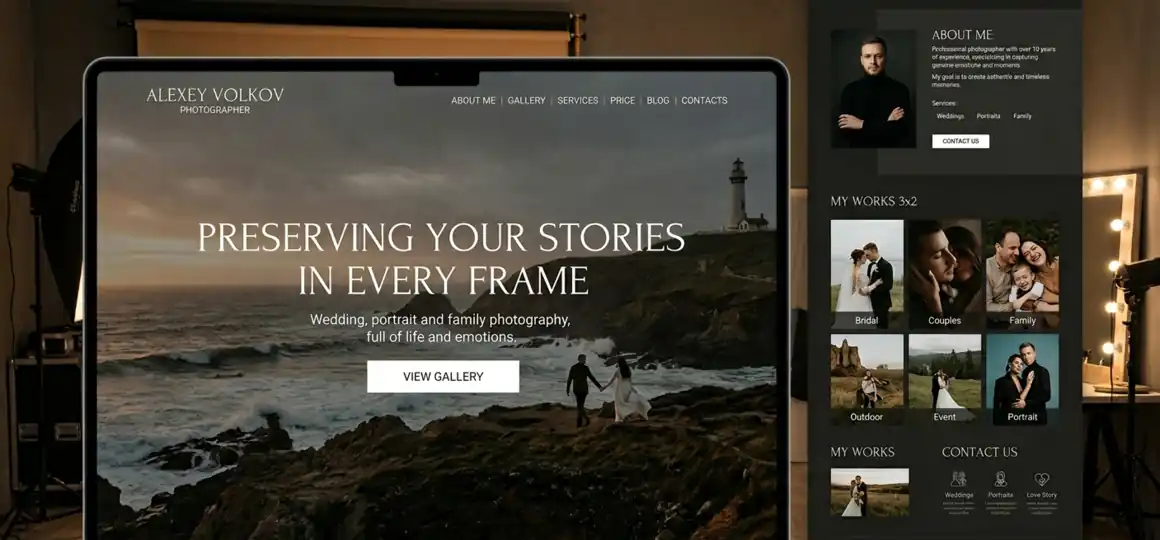
The vibe problem
Most photographers lose potential clients before those clients even look at a single photo. The issue isn't the work — it's the context. A site that feels like a template signals that the photographer treats their business like a template too. Clients who are willing to pay for a specific aesthetic, a specific energy, a specific eye — they're looking for evidence of intentionality everywhere, including in the site design.
The deeper problem is that "vibe" is genuinely hard to articulate, let alone design for. Photographers know their aesthetic instinctively. They can point to their work and say: this is mine. But translating that into a coherent digital experience — layout, color temperature, spacing, copy tone — is a different skill entirely, one that has nothing to do with photography.
This is the gap most landing pages for photographers fall into: technically functional, visually inoffensive, emotionally inert. The site doesn't repel anyone. It also doesn't pull the right people in.
What a landing page actually sells
A visitor lands on your page and within a few seconds forms a judgment — not about your photos specifically, but about whether this photographer is for them. This happens before they've scrolled, before they've read your bio, before they've checked your prices.
What they're reading in those seconds:
- the weight and spacing of your layout — does it feel curated or cluttered?
- the tone of your headline — is it confident, generic, or trying too hard?
- the color palette — does it match the emotional register of the work?
- the scale at which photos are presented — are they treated as art or as thumbnails?
This is why the common advice to "just show your best work" misses something important. The images matter, but so does the frame around them. A fine-art portrait photographer presenting their work in a layout that looks like a wedding photography template has already created a mismatch — before a single image loads.
A photography website landing page that works is one where the design decisions and the photographic work are in conversation with each other. The page doesn't just display the work; it extends it.
Consider a concrete scenario: a documentary family photographer — relaxed, candid, anti-posed — whose site opens with a formal serif headline, tight symmetrical layout, and a white-glove studio aesthetic. The photos tell one story. The site tells another. Prospective clients who want exactly what this photographer does may scroll past, unconvinced, because the overall signal is inconsistent. The solution isn't better photos. It's alignment.
Design choices that carry meaning
Negative space is the most underused tool in photography site design. When images are given room — real room, not just padding — they communicate differently. They feel considered. They feel expensive. A gallery where photos are crowded together, or worse, separated only by thin lines, flattens their impact. The same image, given generous surrounding space, reads as a deliberate choice rather than a file in a folder.
Typography carries emotional information that most people process without noticing. A condensed sans-serif reads as editorial and modern. A humanist serif reads as warm and considered. A geometric sans-serif reads as clean and minimal. These aren't just aesthetic preferences — they're tonal signals that either reinforce or contradict the mood of the photography. A photographer whose work is moody and cinematic presenting it in a light, rounded, friendly font is working against themselves.
A few design principles worth internalizing for a photographer website:
- one dominant font family, with weight variation doing the work of contrast — not two competing styles;
- image presentation at full-width or near-full-width wherever possible, especially for hero and feature shots;
- a color palette pulled from the photography itself, not chosen independently of it;
- copy written in the same register as the work — a street photographer's site probably shouldn't sound like a luxury wedding brochure.
These principles don't operate in isolation — they work together as a system. If you want to see how they stack up across a full page, the anatomy of a high-converting portfolio site breaks it down section by section.
Closer AI website builder generates layouts that default to generous spacing and typographic harmony — and the both are not arbitrary. The AI selects harmonious font pairings from the start, and if you want to explore further, the editor offers dozens of additional curated combinations. If the overall output doesn't match your vision, individual sections can be regenerated or tweaked independently, until the design feels like yours. For photographers who know what they want but struggle to build it, this shifts the dynamic considerably: instead of compromising with a template, you're refining toward an ideal.
Writing for your client, not about yourself
The copy on a photography landing page fails, if it describes the photographer instead of speaking to the client. "I'm a passionate storyteller with an eye for authentic moments" is a sentence about the photographer. A client reading it learns something about your self-perception, but nothing about what working with you actually feels like — or whether you're right for them.
Effective copy on a photographer's site does one thing consistently: it mirrors the client's situation back at them, then positions the photographer as the person who resolves it. A wedding photographer might write: "You've spent months planning every detail. The photos are how all of it lives on." That's not a description of a service. It's an acknowledgment of what the client actually cares about.
A few content choices that shape how a page reads:
- the hero headline sets the emotional register for everything that follows — a single declarative sentence ("Weddings shot like films. No poses, no prompts.") does more work than a tagline about passion or storytelling;
- the bio should include one specific, concrete detail — the camera you've carried for ten years, the city neighborhood you've shot for five — because specificity builds credibility faster than a list of qualities;
- client-facing language in CTAs ("Let's figure out if we're a good fit") outperforms generic prompts ("Contact me") because it signals that you're selective, which makes the client feel selected;
- testimonials work hardest here when they describe an experience, not a result — "She made us forget the camera was there" beats "Amazing photos, highly recommend."
The structure of the page matters here too. A landing page that leads with a gallery assumes the work speaks for itself. Sometimes it does. But for photographers in competitive niches — weddings, branding, newborns — leading with a headline that positions your specific approach, followed by selective images that prove it, tends to convert better than an undifferentiated portfolio grid.
From AI draft to your voice
AI-generated sites have a reputation problem — and sometimes it's deserved. When every element is left exactly as generated, the result can feel smooth but impersonal, like a concept rather than a business. The goal isn't to publish an AI draft. It's to use the draft as a structural and tonal starting point, then push it toward something specific.
Here's where most photographers get this wrong: they either over-edit everything (spending hours adjusting spacing that was already correct) or under-edit the things that actually matter (leaving placeholder copy that sounds like no one in particular). The productive approach is selective. Let the AI handle the foundation ― structure, layout logic, and initial copy tone — then focus your editing energy on the things only you can supply.
What to replace, always:
- the hero headline — it needs to sound like you, not like a description of photographers in general;
- the bio section — this is where your specific background, sensibility, and point of view belong;
- the imagery — AI-generated images are placeholders, not a portfolio.
What to reconsider if it doesn't fit:
- the section order and number — does the page lead with what matters most to your specific clients? Is the first set of sections/pages enough to show your vibe and portfolio or do you need to add more?
- the call-to-action language — "Book now" and "Let's talk" communicate different levels of formality.
What to check before publishing:
- how galleries and hero images render on a phone screen — Closer handles full responsiveness automatically, but your uploaded content is worth reviewing on mobile before the site goes live;
- page speed — if images aren't compressed, even a well-designed site loads slowly, and that friction lands right at the moment of first impression.
Photography landing page examples that work aren't necessarily those with the most original design. They're the ones where the design and the photographer's voice are coherent.
Closer's inline AI assistant is worth noting here: rather than switching contexts to write copy separately, it's available inside any block. A photographer who knows his work but struggles to write about it can prompt the assistant directly — "describe the feeling of my documentary portrait work" — and edit from a draft rather than write from a blank page. That shift from blank to draft is, for most people, the hardest part.
What a landing page can and cannot do
A photography landing page can do a lot. It can establish credibility before a conversation starts. It can attract clients whose aesthetic is already aligned with yours. It can reduce the friction between "found you online" and "booked a call." With basic SEO configuration — title tags, meta descriptions, image alt text — it can also start surfacing in Google results for local and niche searches, which compounds over time.
What it cannot do: close the deal on its own. A landing page is a filter and a warm-up. It qualifies interest and builds initial trust. But the work still has to be delivered, and so does the photographer during the booking process. A site that overpromises — visually sophisticated but disconnected from the actual work — creates a different problem: clients who arrive with misaligned expectations.
The honest ceiling of a landing page is this: it amplifies what's already there. A photographer with a clear aesthetic and strong work will see that amplified by a well-designed site. A photographer still developing their voice will get less return, not because the site is bad, but because the underlying signal is still forming. In that case, the site is still worth having — but the expectations should be calibrated accordingly.
Summary
A photography landing page works when design and content are in alignment — not just with each other, but with the actual work. The vibe a photographer projects online either matches their photography or it doesn't, and clients who care about aesthetic are sensitive to that gap.
The practical path: start with an AI-generated draft (Closer will handle layout, spacing, and initial copy), then edit selectively — headlines, bio, real images, and your call-to-action. Don't over-engineer the design. Do make sure the copy sounds like you.
This approach works well for: photographers with a defined aesthetic who need a professional site fast, without a design background or budget for a custom build.
It works less well for: photographers still developing their style, or those whose work spans multiple genres with no clear throughline — the site will be technically solid, but the underlying positioning question remains open.
The next step is concrete: open Closer, describe your work in a few sentences — the mood, the subjects, the feeling you're going for — and generate a first draft. Treat it as raw material. Your job from there is to close the gap between "a photographer" and you.
Ready to move from concept to published page? Build a landing page for your idea in under 1 hour!


